Showing posts with label photographs. Show all posts

9.09.2009

Taking Extraordinary Photographs

What is the difference between a good photograph and a bad photograph? Usually just two things! First, proper lighting is the biggest culprit for a bad photograph. Once you learn how to properly light a room the rest is easy. Second, is the ability to edit/correct a photograph with a photo editing software. Even professional photographers edit their best shots to make them even better.

About Your Camera:

Of course, you need a good camera! Those of you that have been reading my E-Zines for the past several years know I highly recommend a SLR (Single Lens Reflex) camera. A digital SLR camera is very similar to a 35mm camera. SLR cameras offer the advantage of a detachable lens and faster shutter speeds. When purchasing a SLR camera, you can purchase the camera body and the lens separately. The advantage for our industry is the option of purchasing a good wide-angle lens when room shots are desired. I don't necessarily have a favorite brand; what matters to me most is how it feels in my hand and the number of MegaPixels. I recommend you purchase a camera with at least 8 MegaPixels. I currently have a Nikon D80 with an external Speedlight flash that can tilt and swivel. In all of my seminars, I recommend that people purchase a camera from Ritz Camera or Wolf Camera. My reason is these companies include free photography classes and the cost of the camera is about the same. I also think the extended warranty is a wise investment since cameras are expensive to repair or replace.

External Flash:

An external flash is a must when taking interior room shots! Regular digital point & shoot cameras with built-in flashes cannot produce enough light to fill a room. All SLR cameras include a hot shoe which allows the addition of an external flash. There are many times I can use my Speedlight flash and tilt it straight up toward the ceiling and the lighting is perfect. External lights with umbrellas also produce ample lighting without the harshness of a direct flash.

camera flash
Editing Photographs:
Learning how to edit/correct photographs is easier than you think. For the cost, Adobe Photoshop Elements 7 is one of the most powerful photo editing software I have seen. You can straighten, lighten, crop, color correct, erase unwanted objects and so much more. Once you know the simple techniques you can produce professional results in minutes.

Photoshop Elements 7 460x60

Learn More:
If you would like to learn more about how to use Photoshop Elements, purchase our Learning CD "Working with Photoshop Elements." We also offer a course, "Create a Fabulous Portfolio," that goes into detail about taking photographs. Don't forget that we have a forum dedicated to questions and answers for Photoshop Elements on The Lounge - Studio's online forum.

Learning CD

Promote Yourself:
Once you have great looking photographs, it is easy to create marketing materials such as websites, portfolio books, etc. Here is the portfolio of Anna Davis. Her website was created by Simplified Websites and comes highly recommended by us!

7.09.2009

iPhone ~ It's amazing!

Jerry and I went to the Apple store last weekend and purchased an iPhone for both of us. Jerry got a black one and I got a white one. I love that we can distinguish between the two phones. Why did we both get the same phone? My thought was that with two people learning the same phone the learning curve would be much less. I had researched this phone for over a year, we were already AT&T customers, and we were eligible for the upgrade price of $299. Yes, you know I had to have the best one; the one with the largest hard drive (32GB.)


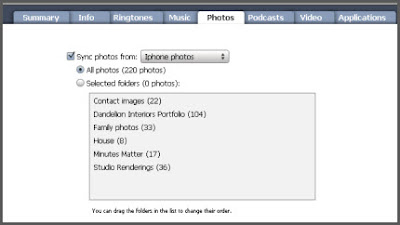
We purchased the iPhone with lots of space. Right now, I'm in the process of adding lots of photos. First, I created a folder called iPhone photos with sub-folders (see above screenshot). The Contact Images folder contains cropped headshots of my contacts. Now when a person calls me on my cell their photo appears. I even got some of my downloaded headshots from Facebook. Did I say already mention that I love this?!? Notice, I also have a Dandelion Portfolio folder so that Jerry and I have our entire portfolio with us everywhere we go. I created these folders and then gave Jerry a copy of them. Now, without any work on his part, he has the same folder. I LOVE THIS SHARING THING! In iTunes, all you do is click on the Photos tab and select the folder you want your phone to always sync with.

The iPhone also doubles as my iPod. That falls under Jerry's duties. He handles all mp3s and I handle all photos. We also added a mosquito repellent app; not sure if this works yet!


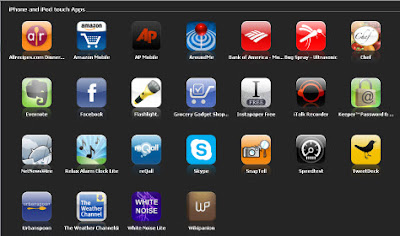
What I loved about the iPhone is all the apps that are available. I know other phones have apps but iPhone seems to have the most at this time. Of course, I added Bank of America since I had been seeing their app advertised for a while now as I have been doing my online banking.

Here is a few of our favorite apps:

http://www.chefslittlehelper.com/ is an app where you can enter your favorite family recipes. Your whole family can have access to them via this website. The website version is available and free to everyone. The iPhone app is .99 cents. What I love about this app is your recipes are always with you. Say you're at the grocery if you decide to make a dish and can't remember the ingredients, just open this app. Now that I have added several of my recipes, Jerry can purchase the app and add those same recipes to his cookbook without any work on his part. It even has a grocery list function. Special Note: all recipes are viewable to everyone; so you can add any one's recipe that is listed to your iPhone app. To find the recipes I have added click the search button then click on the Users tab and type Debbie Green. I have added my meatloaf recipe, my mom's famous spaghetti & meatballs recipe and Jerry's grandmother's sugar cookie recipe. Check them out. I will be adding my Fried Apple recipe soon! I know you guys from up North have never heard of them. They are "to-die-for."

http://www.grocerygadgets.com/ is another app Jerry and I love. This app is $4.99 and both of us had to purchase it. Jerry did the research on what we wanted in a "shopping list" type app. Our requirements were it needed to have the website version as well as the iPhone app, it had to be syncable to both of us. In other words, we wanted one list for both of us. I could add items to the list and his would automatically be updated. And sure enough this one did all that. We tried it out today and Jerry was off to the store with his iPhone in hand. As you check off an item it goes to the bottom of the list. If I add something from home, Jerry instantly gets it added to his list while he's shopping! We also created a weekly grocery list that contains all the items we purchase on a regular basis.

White Noise Lite (added this app from iTunes) Jerry and I have to have noise to sleep and especially when I travel. I can't sleep at all if it's dead quite. This app is so cool. Some of the sounds include crickets, extreme rain, grandfather clock, chimes, white noise, thunder storms, oscillating fan & more and of course you can set the time to repeat for up to 24 hours. How can anyone sleep that long?? We are using the lite version which is free!!

Around Me (added this app from iTunes) On the iPhone click on the app to view a list of banks, bars, coffee, gas stations, hospitals, hotels, restaurants, supermarkets, theaters ... there are just too many to list. Click on the desired category to view results. This app is free!

http://www.keeperapp.com/ I am always needing a password for something. I have a physical password journal on my desk, but there are many times that I need a password and I am away from my office. This is the perfect solution for me. It is totally secured with Military-Grade encryption (128-bit AES). I can even export these to share with Jerry. This app is free too!

7.03.2009

Create an Unforgettable Photo Book for your Business!

I created this book for my Dandelion Interiors business. As you look through the book you will notice the custom background. You can create custom backgrounds like the one in my Dandelion book in Studio. This is the reason we selected Picaboo to create our portfolio book. This book did not require near the time the other books for Owen and Lee took.

7.02.2009

Create an Unforgettable Photo Book for your Children!

I just finished created photo books for my sons and their wives Owen & Casey and Lee & Leah. I used Picaboo to create these books. The books actually took several months to compile. I have over 100 years of photos that I gathered from a lot of different family members. The books are fabulous!! The time consuming part is the actual gathering of the photographs. WOW, who knew gathering photos would consume most of the time. Here are some tips when creating a photo book with a large amount of pages.

  • Create a file folder under Pictures or My Pictures "Picaboo Photo Album"
  • Decide how you want to organize. Below are the folders I created for my two books.
  • Owen (my oldest son by himself)
  • Lee (my youngest son by himself)
  • Owen & Lee (both boys together)
  • Jerry's Mother side of the family
  • My side of the family
  • Casey's side of the family (Owen's wife)
  • Leah's side of the family (Lee's Wife)

During my photo search, I wanted to add school photos to show what how they changed through the years. They had lots of different pets so I wanted to make sure I added photos of all their pets. I took a cake decorating class when the boys were young so I wanted to add photos of some of the special cakes I made. As you can see I did several groupings of their different interests on the pages inside the book. Both books have around 300 photographs. Most of the photos had to be scanned since it was before the digital age. NOTE: For the digital photos I copied and pasted them into the appropriate files. In other words, I left the original in it's folder.

I gave them a preview of what I was doing several months ago and they loved it. What is so great about this concept is the fact it is so compact and 300 photos are in just one photo book. The books highlight most of the events in their lives and gives them a sense of their heritage. Another thing, we all realized is that you can certainly see where certain family members get their looks. It has been a journey down memory lane. It was hard to tear myself away from the project. One thing I am sure of is I am glad I am FINISHED!!!

For you young mothers, the moral of this story is to take lots of pictures you'll be glad you did one day. It seems that the first child has lots of photographs and then the photos start to taper off for each child after that. If you have a tradition or something that is unique in your family be sure to snap those shots so they can be recorded in your family history.